Purchase Price Validation
The Purchase Price Validation helps buyers evaluate whether a supplier quote or intended purchase price is fair relative to current market conditions. It compares a user-provided price against the Fair Market Value (FMV) and historical transaction data to determine whether the price is below, within, or above market level.
Input parameters
Three parameters are required:
Part number — autocomplete search across all known part numbers
Material condition — select from the standard condition list
Price [USD] — the purchase price to validate
After entering these details, initiate the validation by pressing “Enter” or clicking the “Validate Price” button.
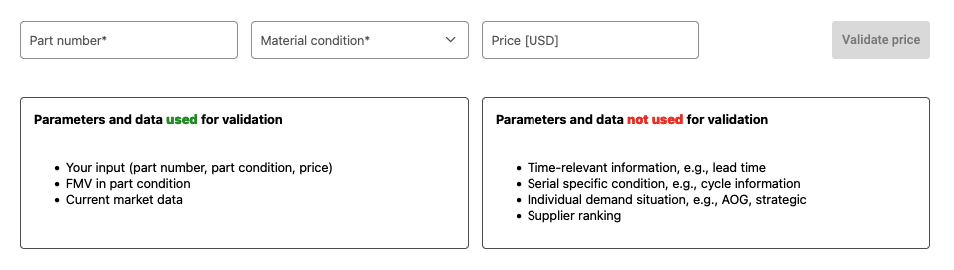
Input form for purchase price validation
The system uses the entered part number, condition, and price together with the FMV and current market data to determine the validity of the price. The following factors are not considered:
Time-sensitive information (e.g., lead time)
Serial-specific condition data (e.g., cycle information)
Individual demand circumstances (e.g., AOG, strategic sourcing)
Supplier ranking
Results
The results screen provides comprehensive details about the part, the validation input parameters, and the validation outcome. The methodology follows the same approach used across other IATA MRO SmartHub modules.
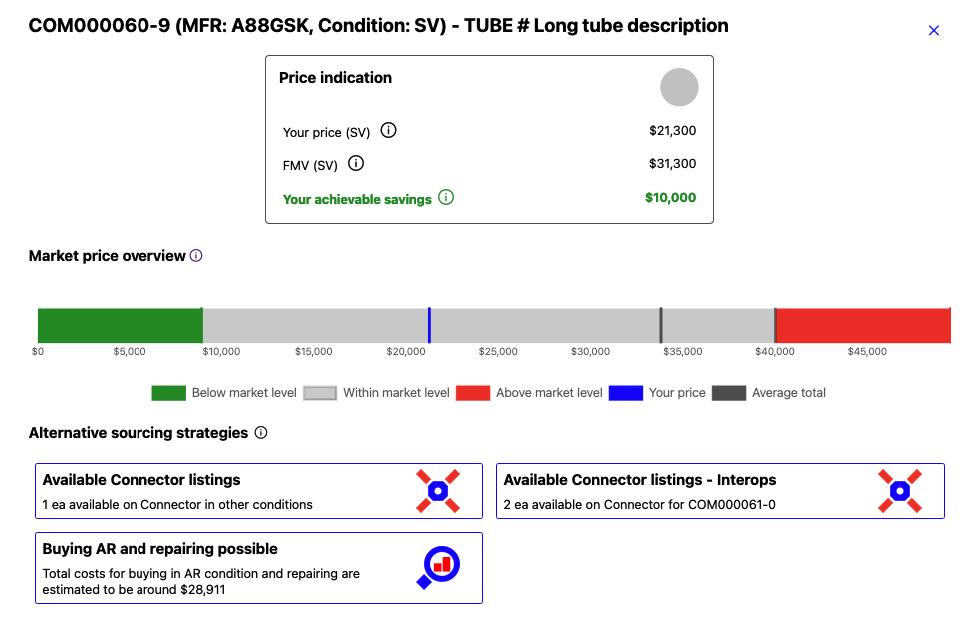
Validation results for a particular part number
Price indication
This section compares the entered price to the Fair Market Value. It is shown when an applicable FMV exists for the given part number and condition combination with an FMV stage of 1 to 4. The section displays:
Traffic Light Indication — a summary showing whether the price is below, within, or above market level based on the distribution of available transaction data.
Your Price — the price entered for the part in the selected condition.
FMV — the Fair Market Value for the same part and condition.
Your Achievable Savings — shown when the entered price is lower than the FMV, indicating that the price is better than the market reference.
Your Additional Costs — shown when the entered price exceeds the FMV, indicating the potential savings when orientating at the FMV.
Note
The price indication section may not be shown with full details when no applicable FMV is available. For example, for consumables the IATA MRO SmartHub calculates FMVs only in NE and NS condition. If the entered condition is worse than NS, no FMV comparison can be displayed.
Market price overview
This chart displays the distribution of market prices for the entered part number using a quantile calculation. Three price zones are shown:
Green area — prices below the average market level. The upper limit is defined by the 10th percentile of transaction prices.
Red area — prices above the average market level. The lower limit is defined by the 90th percentile of transaction prices.
Grey area — prices within the average market level.
The chart includes the following reference lines:
Blue line — the entered price.
Black line — the average market price across all available price data.
Yellow line — the average market price for events within the last 6 months. Only displayed if events exist in that period.
Light yellow line — the average market price for events within the last 12 months. Only displayed if events exist in that period.
Note
All average market prices are calculated using events of the same part condition only.
Alternative sourcing strategies
This section offers strategic alternatives based on available listings and data in IATA MRO SmartHub:
Available Connector listings — other options for the part and potential interchangeable parts available on the Connector marketplace.
Available Asset Manager listings — options available for the part through active Asset Manager projects.
Buying AR and repairing — the estimated cost of purchasing the part in As-Removed (AR) condition and having it repaired.
Buying AR and overhauling — the estimated cost of purchasing the part in As-Removed (AR) condition and having it overhauled.